How it works Events & trade shows First steps LinkedIn-compliant Pricing For agencies Corporate Influencers FAQ Platform login Request a test account
WerkMomente, by Vertriebsrakete
Test accounts available · Live at Drei Austria

Your team posts on LinkedIn regularly.
And enjoys it.

Real moments from your workday become LinkedIn posts that sound like your people. Built in-house or pre-produced — published through the official LinkedIn API.

Also here: The event case: Humanoid Forum · 11 chaptersNew 10 reasons experts stay quiet Live demo (German)

app.werkmomente.com · DreiBusiness · Wall
Live at Drei Austria
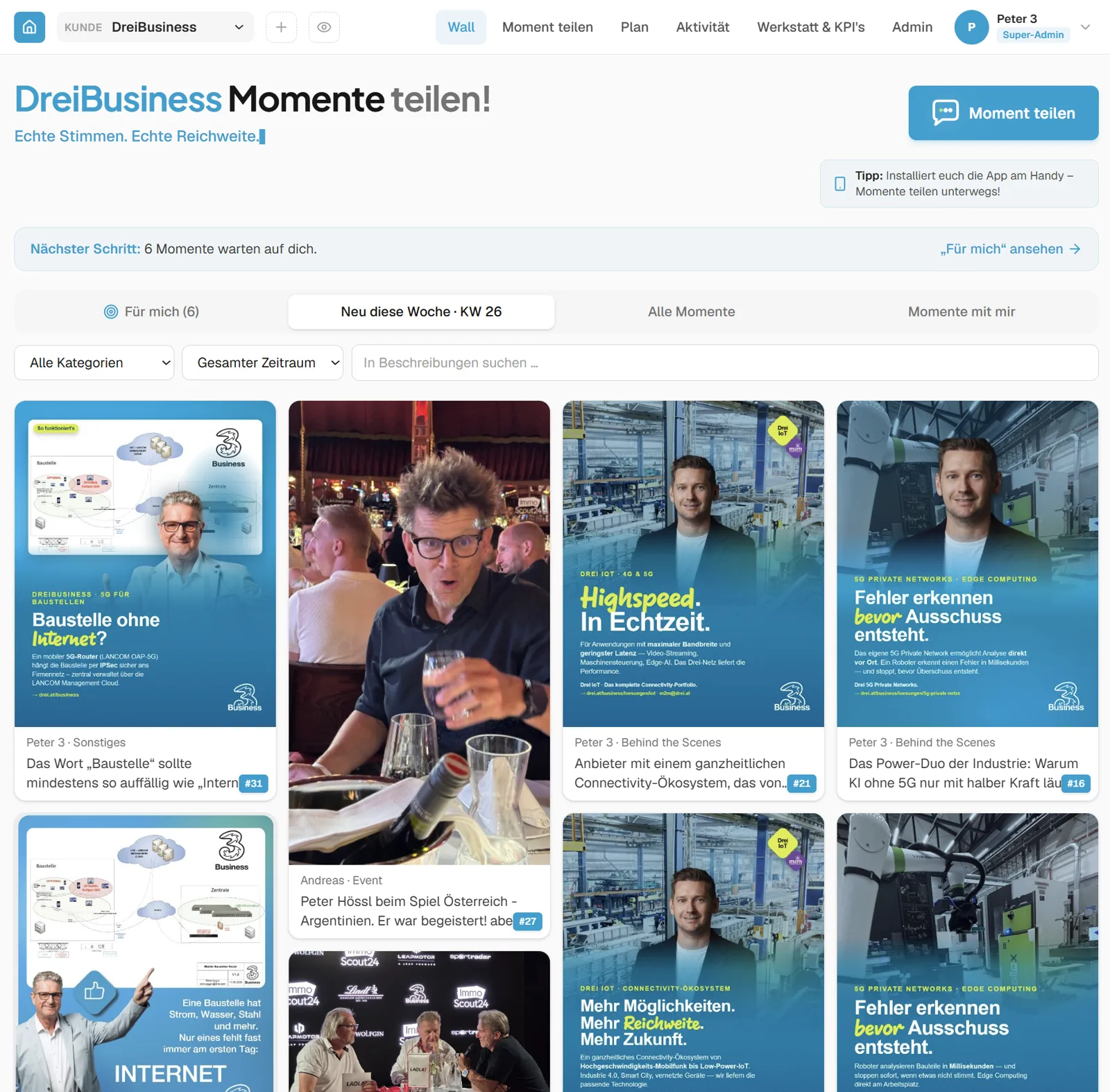
WerkMomente in live use at Drei Austria: the Wall with the pool of moments and assignment to individual people
Click a tile: this is how a moment becomes a post
Before / after The difference is the sentence you start with.
“Please post more on LinkedIn.”
“Here are three angles on your specialist topic, turn one into your post.”

The first is a request. The second is a starting point with subject-matter substance. WerkMomente always delivers the second.

A note on the screenshots: the annotations are in English, the product interface itself currently ships in German. If an English interface matters for your rollout, say so in your test account request — that is what decides what we build next.
Content plan · the next four weeks
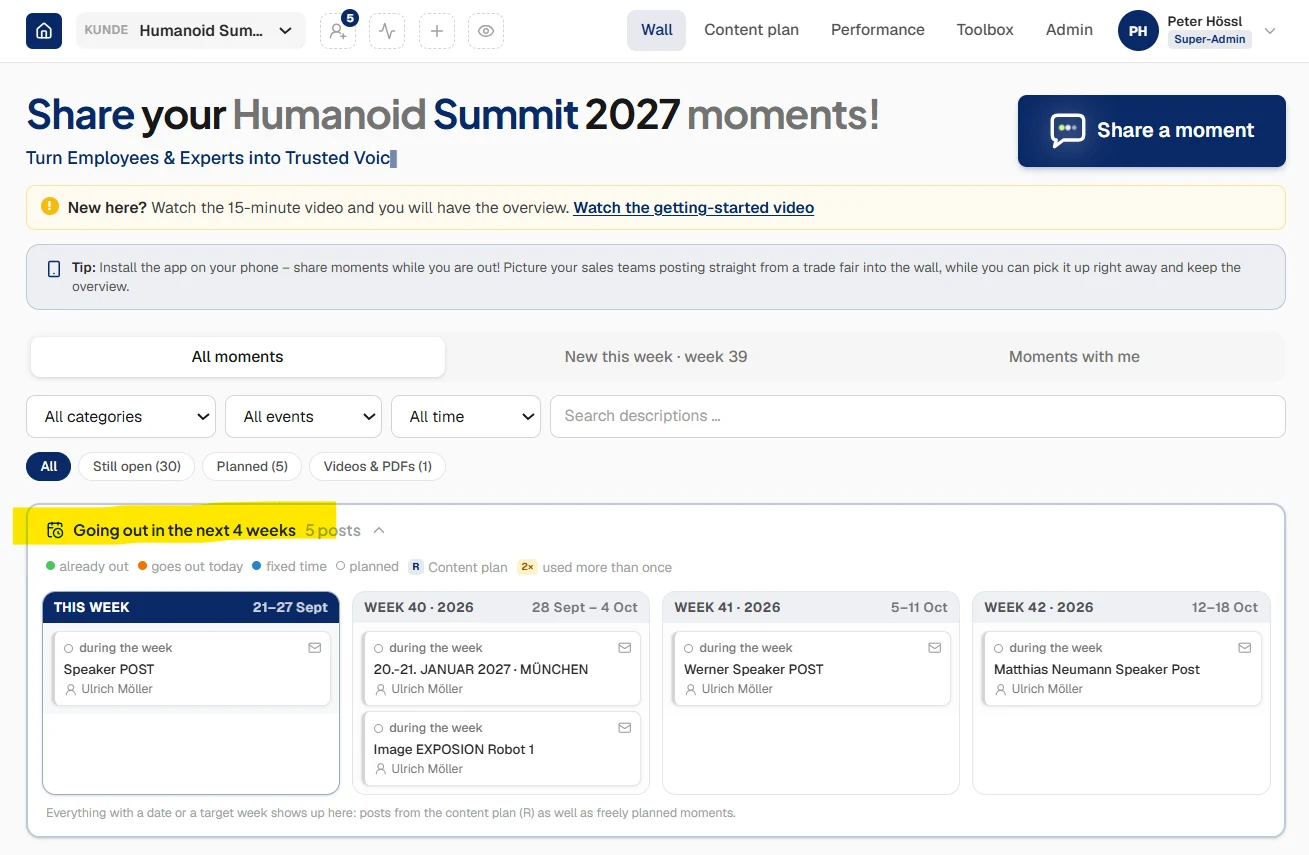
Four-week preview in WerkMomente with a colour key for posts already published, due today, fixed to a time or merely planned

Every status at a glance. Anything with a date or a target week shows up here – posts from the content plan as well as freely planned moments. The R marks what came out of the plan.

The Wall · everything that is ready
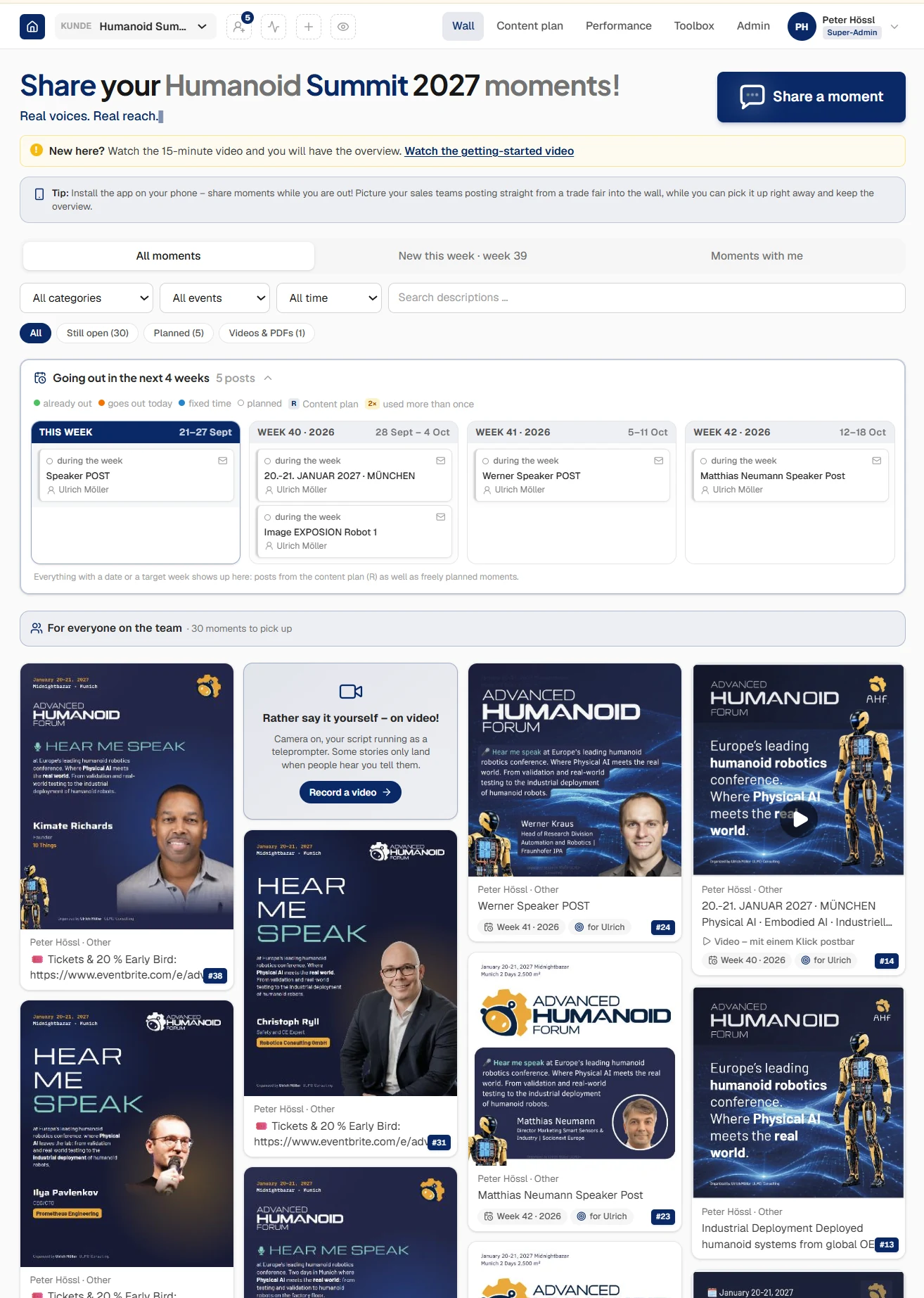
Wall view in WerkMomente with filters, the four-week preview and the pool of moments the team can pick up

The Wall. The next four weeks at the top, the pool underneath – here 30 moments anyone can pick up. Filter by category, event and period, and the search runs across every description.

Assign & plan the week
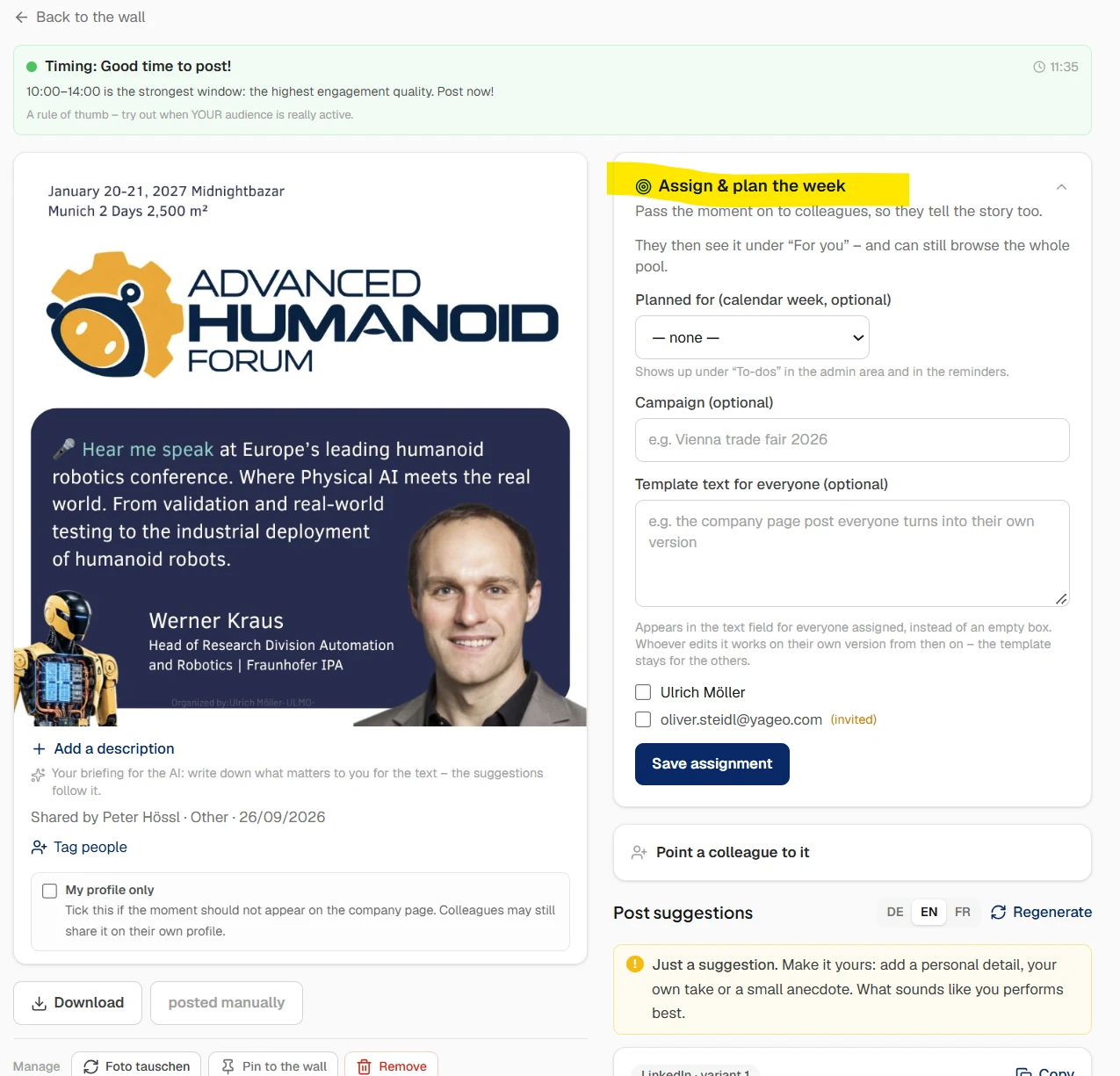
Assignment panel in WerkMomente: calendar week, campaign, template text for everyone assigned, and the list of colleagues to tick

Hand it on instead of writing it yourself. Set the week, attach a campaign, tick the colleagues. The template text then sits in everyone’s field instead of an empty box – write over it, or keep it.

Prepared for someone else
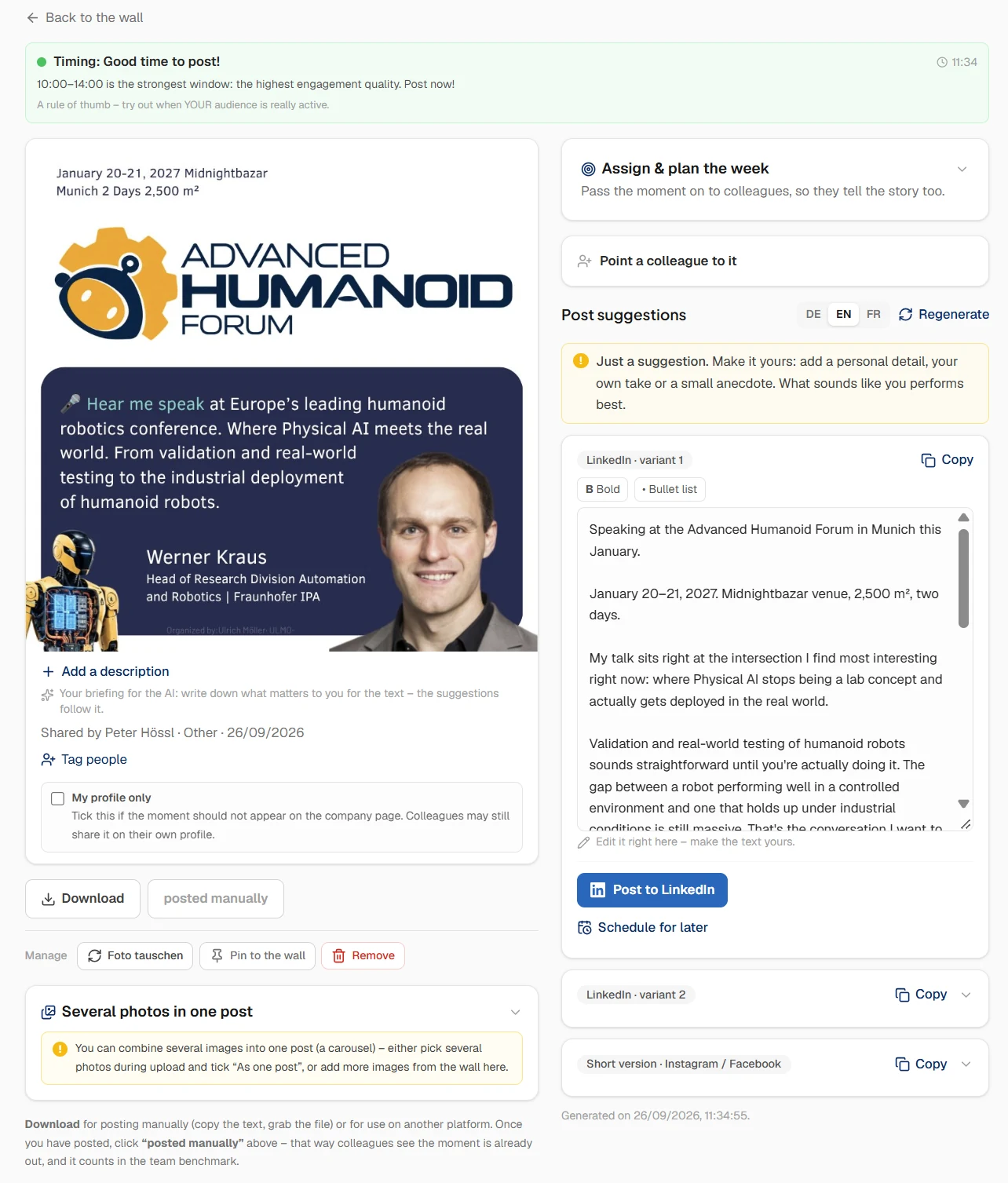
A prepared post in WerkMomente: image and briefing on the left, the finished draft with language choice and the buttons to post or schedule on the right

Somebody already did the groundwork. Here the event manager prepared the post for a speaker – image, briefing, text. The speaker opens it, changes whatever they want and posts it themselves. Their name, their voice.

One moment, in full
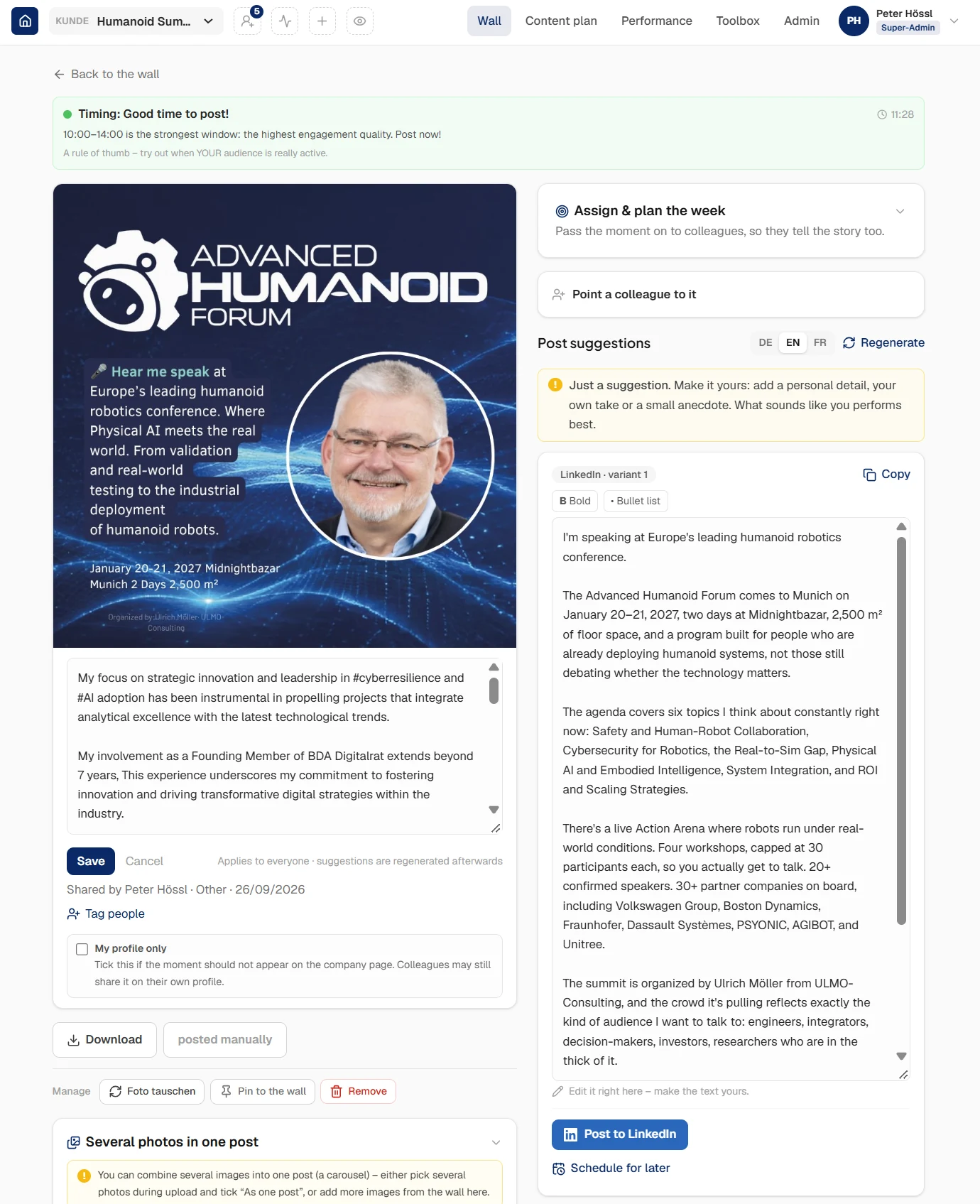
Detail view of a moment in WerkMomente with the posting traffic light, image, briefing, draft text and scheduling options

Everything in one place. The posting window, the image, the briefing that feeds the AI, the draft next to it. No switching between tools, no hunting for the graphic.

Make the suggestion your own
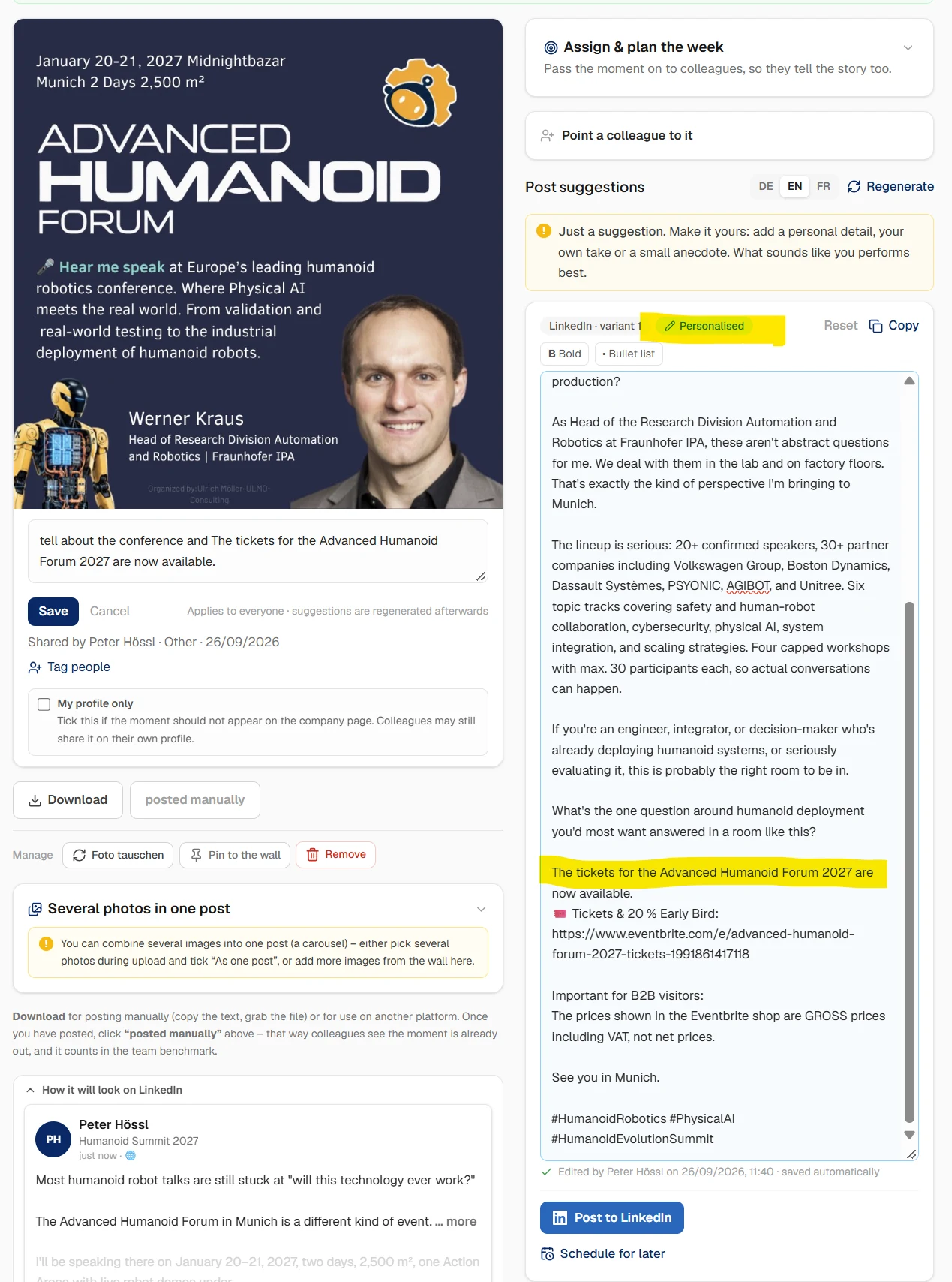
Text editing in WerkMomente: the reminder that the draft is only a suggestion, and the chip marking the text as personalised

This is the whole point. “Just a suggestion – make it yours.” The moment you change something, the text carries the personalised chip. Pure AI copy reads like pure AI copy; edited copy does not.

Preview & quality check
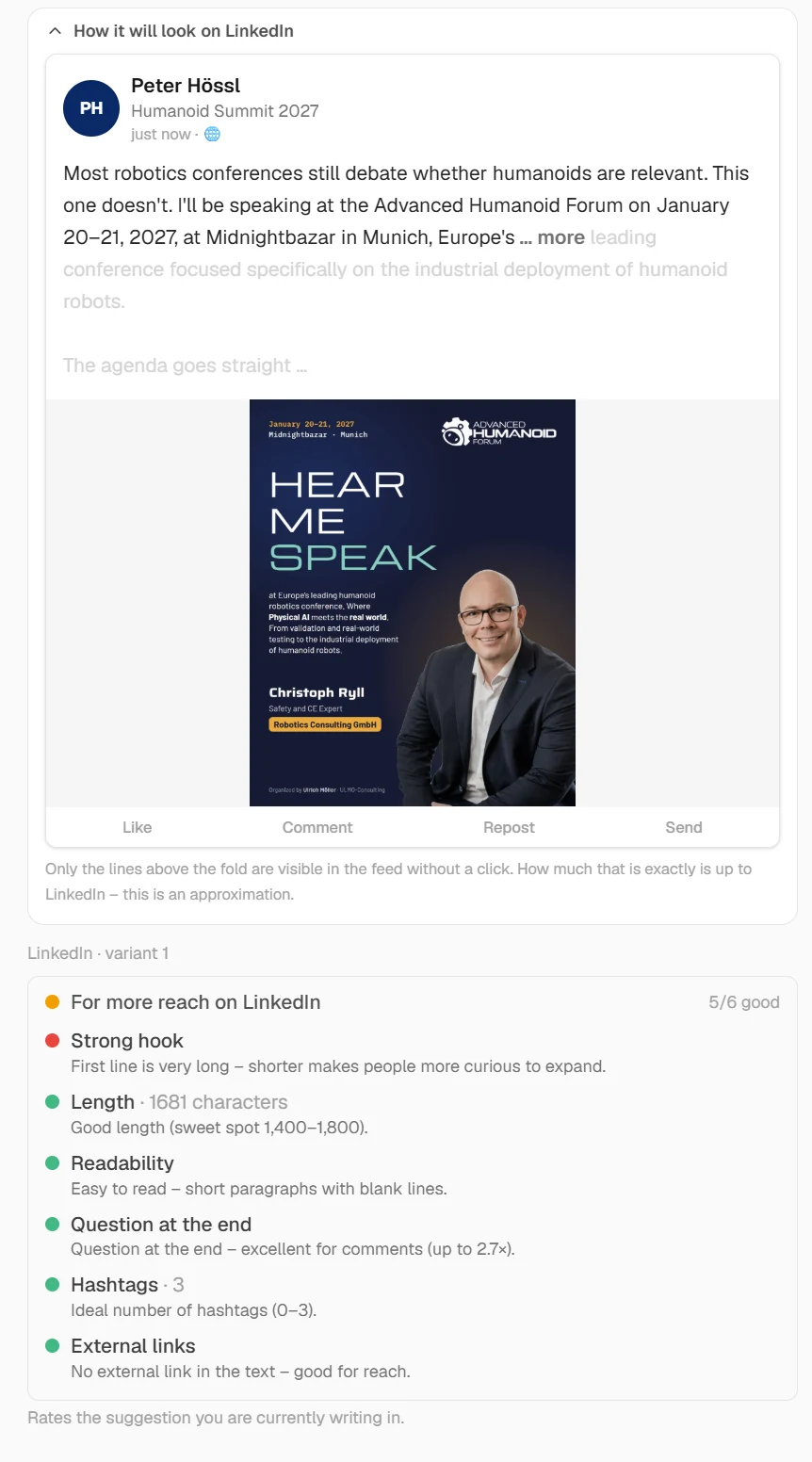
LinkedIn preview in WerkMomente showing where the feed cuts the text off, next to a check rating the post on hook, length, readability, closing question, hashtags and external links

Before you post, not after. On the left, what the feed shows without a click. On the right, six checks – hook, length, readability, a closing question, hashtags, external links – and what would make the post land better.

Card templates · for the whole team
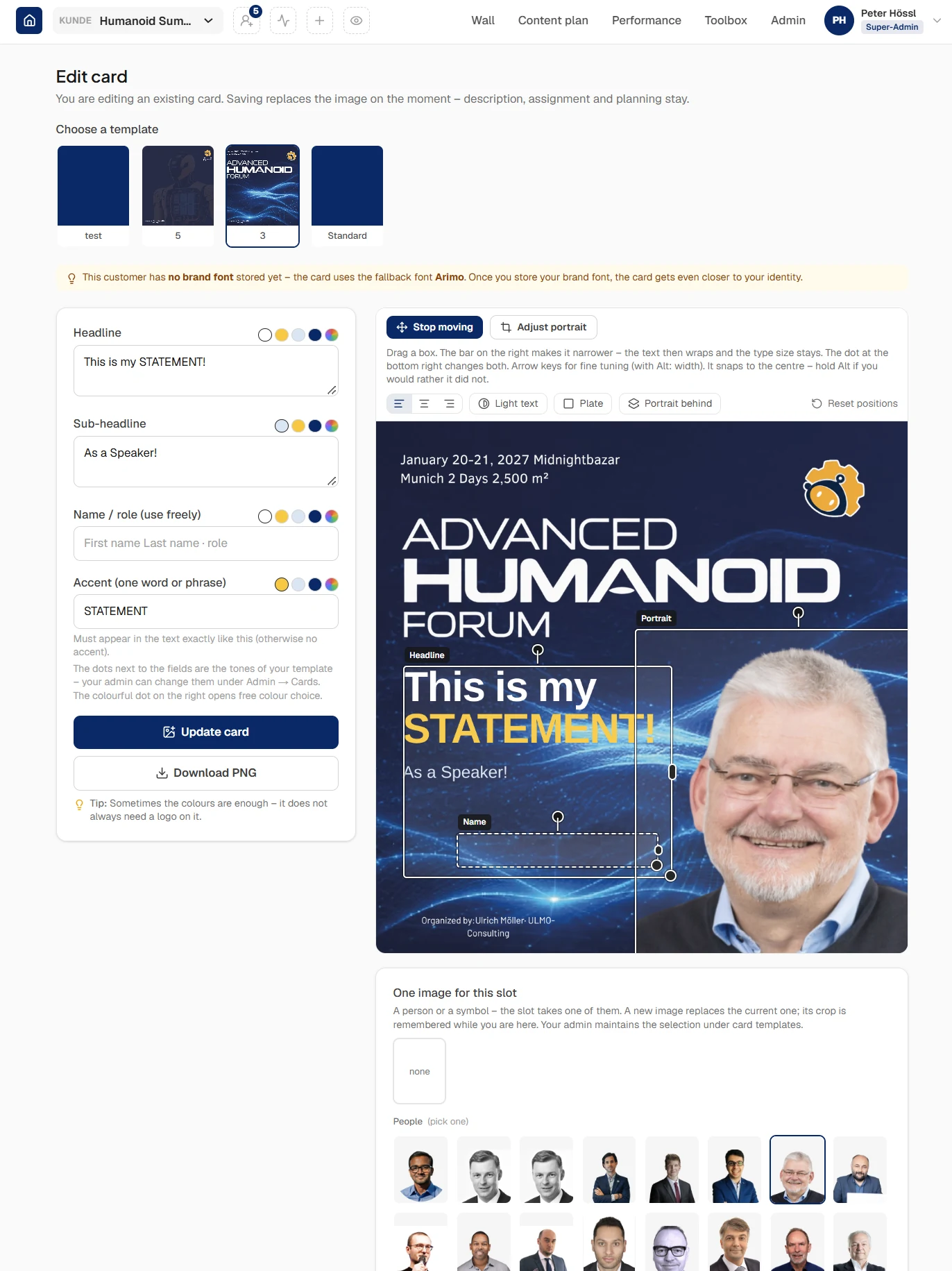
Template selection in the WerkMomente card editor with several card layouts and a choice of cut-out portraits

No image at hand? Build one. Pick a layout at the top, a portrait underneath, type four lines. Colours, logo and type come from your stored template – so everyone builds their own card and they still look like one sender.

Eight views from live customer accounts · use the arrows or swipe · tap to enlarge

Officially certified on the LinkedIn Developer Program
Secure OAuth connection, reviewed by LinkedIn.
WerkMomente publishes through the official LinkedIn API, not through browser automation. The app has been through LinkedIn's review process and is approved for w_member_social (posting on behalf of employees with their consent).
How it works

In 4 steps to more visibility for your leaders and experts.

1

Plan & content

We, your consultant or your agency build the editorial plan – or you import your own. You produce the posts yourselves (image, carousel, PDF, video), or they are pre-produced for individual people and teams.

2

The team picks

On the Wall, colleagues choose the moments that fit them – or upload their own photos and moments. “For me” shows what was prepared specifically for them.

3

AI, but personalised

For every moment, the AI offers text suggestions – as orientation, not to copy and paste. We have no interest in filling LinkedIn with AI sludge: the suggestion becomes the person's own idea, with a personal detail.

4

Publish in one click

Straight to your own LinkedIn profile, or scheduled for later. Under your own name, in your own words – or you post for your manager or sales director, so leadership stays visible without carving out the time.

Full product tour with screenshots →
WerkMomente for B2B eventsNew

The platform for trade shows, conferences and roadshows – and a case that shows why.

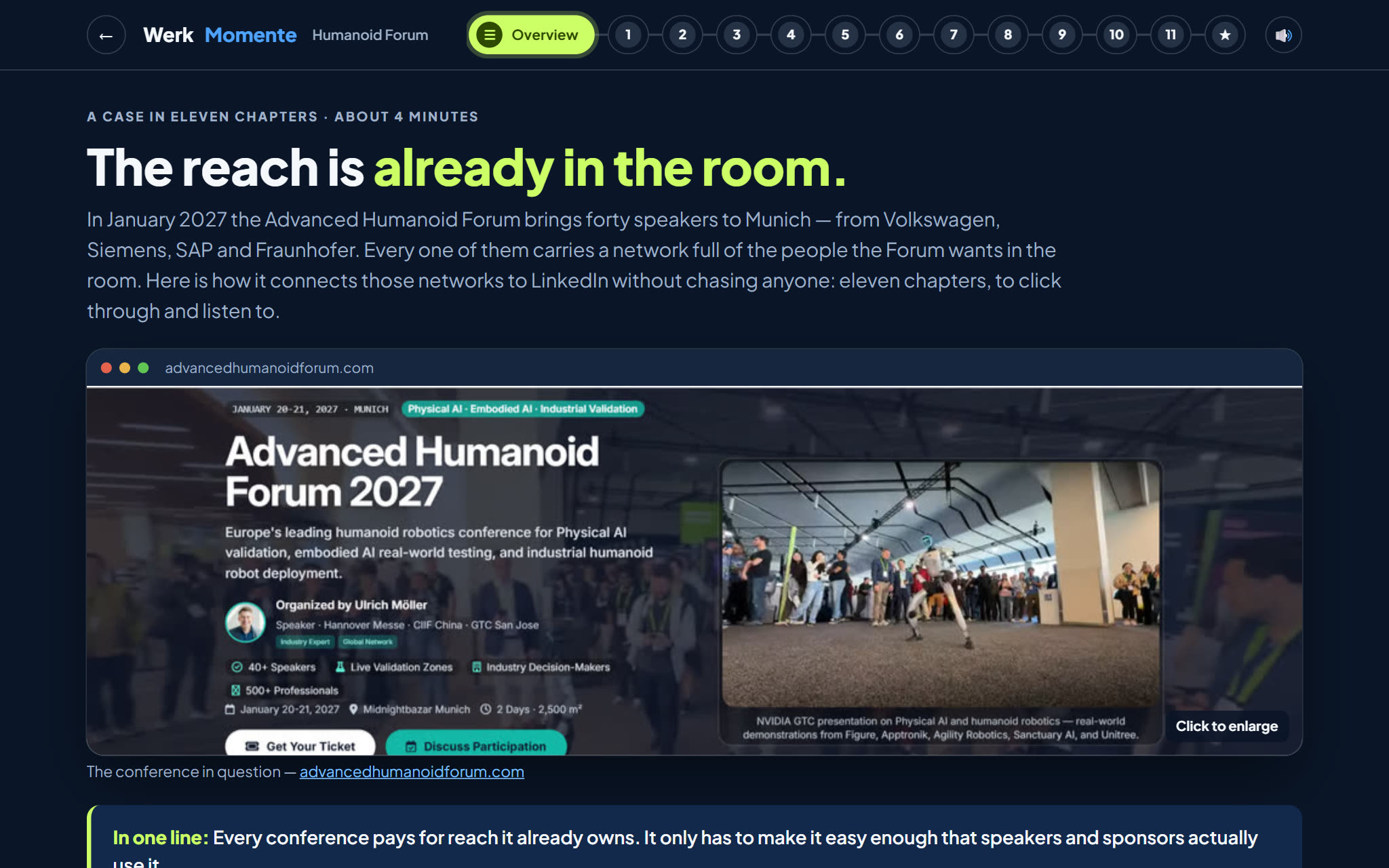
At every event the reach is already in the room: speakers, sponsors, press. Connecting it costs no media budget – only a short path. Here is an example from the Advanced Humanoid Forum 2027 in Munich: forty speakers from Volkswagen, Siemens, SAP and Fraunhofer, and how organiser Ulrich Möller connects their networks to LinkedIn – on real screens from his own space, nothing staged.

  • 1A forum in preparation
  • 2What gets left on the table
  • 3Networking
  • 4Before, during, after
  • ✓and seven more
  • about 4 minutes
  • click through and listen
  • published with consent
  • also in German
See the case Auf Deutsch →
Running trade shows, conferences or roadshows? The case does the arithmetic for what is being left on the table at yours.
Advanced Humanoid Forum reference case: eleven chapters with running times and the forum key facts
And what it looks like in practice

Nine minutes, five chapters: how a programme actually gets built.

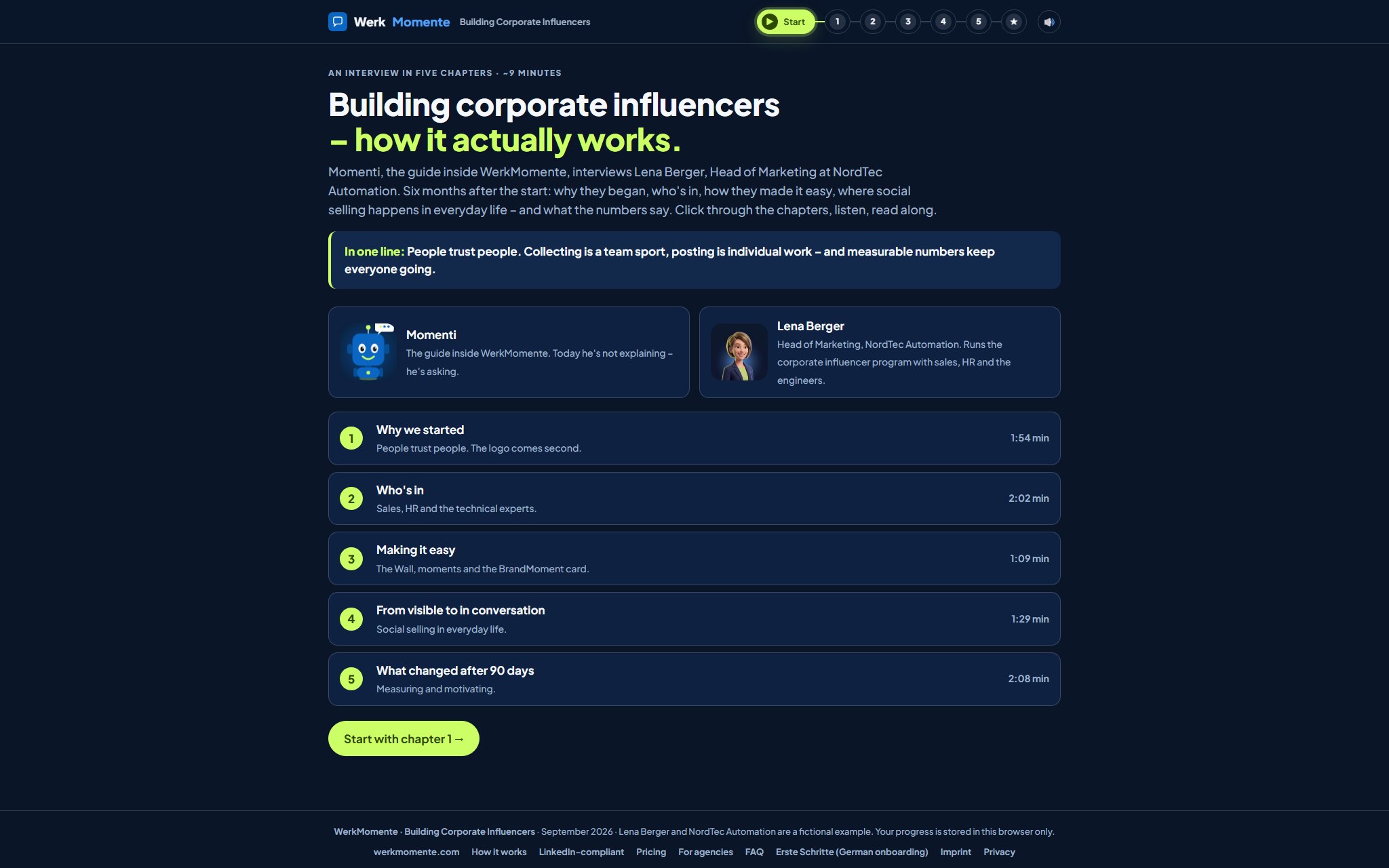
Momenti, the guide inside WerkMomente, turns the tables. Instead of explaining, he interviews Lena Berger, Head of Marketing at NordTec Automation, six months into her corporate influencer programme with sales, HR and the engineers. Why they started, who is actually in, how they made posting easy, where social selling happens in everyday work – and what the numbers said after 90 days. Lena and NordTec are a fictional example; the mechanics behind her answers are not.

  • 1Why we started
  • 2Who’s in
  • 3Making it easy
  • 4From visible to in conversation
  • 5What changed after 90 days
  • ✓Wrap-up
  • about 9 minutes
  • narrated & animated
  • a conversation, not a lecture
  • no login, no installation
Watch the interview First the product tour →
Runs straight in the browser · your progress stays on your own device
Interview „Building Corporate Influencers“: Momenti and Lena Berger side by side with their roles, followed by the list of five chapters with running times

You have set everything up. Now only the posting is missing.

Running the programme in-house? Or with an agency alongside you? What is the goal, and where do the moments actually help?

One programme, one tool, several levers. WerkMomente brings together what visibility, trust and an employer brand need today – and turns your team's working day into posts people remember.

Social selling

Sales builds reach and relationships before anyone is ready for a meeting.

Employee advocacy

Colleagues share company content credibly, inside their own networks.

Corporate influencing

Experts become visible voices in their field, rather than another brand account.

Brand ambassadors

Real advocates from within the team instead of anonymous advertising.

Employer branding

Authentic glimpses of the working day attract the people you want to hire.

Corporate influencer · impact
Why do all this? What’s in it for you?
Employer branding gets stronger – real insight instead of job ads.
Recruiting costs fall – candidates arrive through real faces.
Better cultural fit – applicants already know how you work.
Churn drops – people who feel seen tend to stay.
Brand awareness rises – including inside AI systems such as ChatGPT.
New customers through social selling – trust builds before the first meeting.
Source: Britta Behrens – “The State of LinkedIn 2026 – Cut the Bullsh*t”
Going deeper: “Corporate Influencing – key research findings” – our review of 8 academic studies from Germany, Austria and Switzerland with practitioner commentary (in German)  ·  Open the research overview ↗
What the others solve – and what we solve.
Haiilo · DSMN8 · Sociabble
They distribute content that already exists.
The assumption underneath: you have finished posts sitting in a cupboard.
WerkMomente
We turn moments into real posts.
From meetings, trade fairs, events. Source and distribution in one tool.
Where does the content come from in the first place?

That is exactly where WerkMomente starts one step earlier. Real moments from the working day become personal expert posts, built by your people or pre-produced for individuals, and the platform comes with it. Source and distribution in one tool.

Want the detail?

Every feature, screenshot and price on one page.

The live Wall, AI suggestions, the BrandMoment card, the connection helper, team benchmark, forecast and a full platform walkthrough — all on How it works.

Full product tour
★ Test accounts available

Want to try WerkMomente on live data?

We are setting up the first teams with test accounts right now. Send me a short message with your email address and I will set you up as a user within minutes. You are an agency and need admin access? Also fine. Let's go.

User account

For you or your team. You work through the Wall, the AI suggestions, the editorial plan and one-click publishing, with the full feature set.

Request a user account

Agency · admin account

You manage posting for several brands or clients. Admin access with multi-brand spaces, full visibility of the editorial plan, users and reporting.

Request admin access
Rather talk it through? Book a 15-minute call · Email peter.hoessl@vertriebs-rakete.com
Already have a login? Go to the platform